AI Summaries
 Action Items
 AI Chat
 Teams & Collaboration
 Teams & Collaboration
 Integrations
  Blog
Blog  Guide
Guide 



Don't miss your meeting insights!
Transform your meetings into actionable insights. Upgrade today and enjoy 60% off, unlimited shared notes, AI-generated summaries, and real-time collaboration.
 12,716+ Customers
Buy at Discount
 Meeting Notes
 Today only — Enjoy higher transcription accuracy, team collaboration, and full meeting history.Meeting Notes
 Remote & Hybrid Work
 Legal & Compliance
 Sales & CRM
 Healthcare
 Project Management
 HR & Recruitment
 Education & Online Learning
 Personal ProductivityToday only — Enjoy higher transcription accuracy, team collaboration, and full meeting history.
Under what circumstances would you need to manage your payment information? The most likely situations include changing your bank card, encountering any problems with your current bank card, or wanting to switch to a different bank card for bill payments.
Regardless of the reason you want to manage your billing information, you can quickly update your billing information or add new payment methods using the methods below.
Step 1. First, log in to your MeetingNotes account, then enter your workspace.
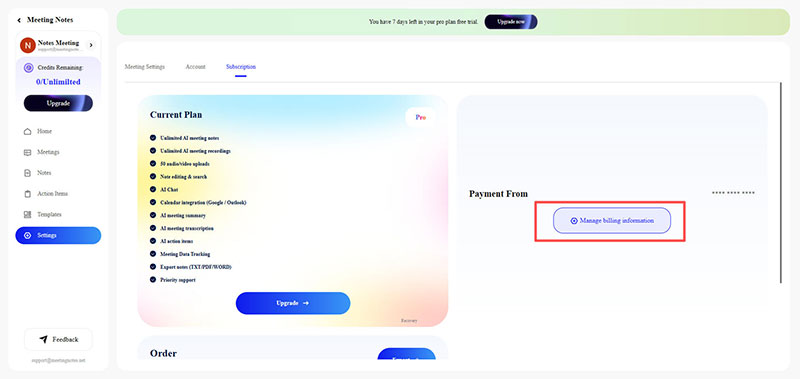
Step 2. Click on Settings in the left-hand menu, or click on your account and select Account from the dropdown menu.
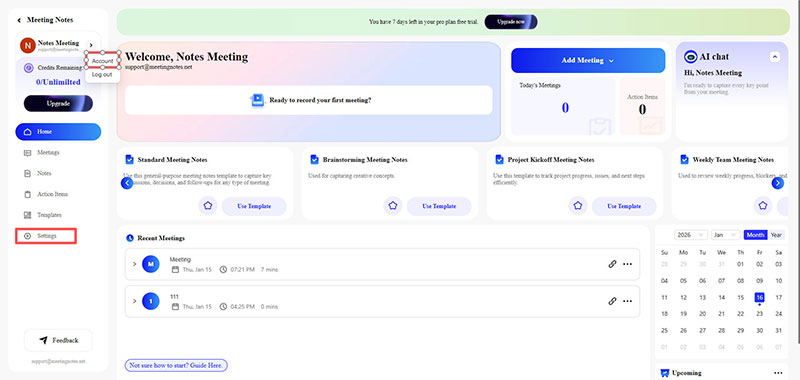
Step 3. On the Settings page, click on the Subscription option at the top to enter Subscription settings.
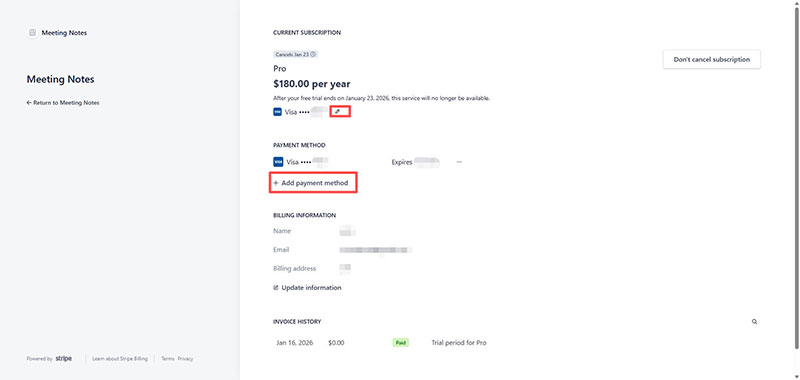
Step 4. Click the "Manage billing information" button to access the Stripe account management page.
Step 5. On the Stripe account management page, click the Edit option to modify your billing information. Alternatively, click Add payment method to add a new card.