AI Summaries
 Action Items
 AI Chat
 Teams & Collaboration
 Teams & Collaboration
 Teams & Collaboration
 Teams & Collaboration
 Teams & Collaboration
 Teams & Collaboration
 Teams & Collaboration
 Teams & Collaboration
 Teams & Collaboration
 Integrations
  Personal Productivity
 Blog
Blog  Guide
Guide Meeting notes contain sensitive information. Strategic plans. Financial details. Personnel discussions. Legal matters. If this information leaks, the damage can be significant.
Yet many organizations treat meeting notes casually. They are stored on personal drives. Shared via email. Or kept in unsecured cloud folders. This creates real security risks.
This guide shows you how to protect your meeting notes. You will learn where to store them, how to share them, and what security practices to follow.
Need secure meeting documentation? MeetingNotes offers enterprise-grade security for sensitive meeting notes. Learn more.
Why Meeting Note Security Matters
Meeting notes are a treasure trove of sensitive information. They contain discussions that competitors would pay to see. They include personal information protected by privacy laws. And they document decisions that could be relevant in legal disputes.
Risks of poor security:
· Competitive intelligence leaks. Rivals learn your strategies and plans.
· Privacy violations. Personal information exposed, violating GDPR, CCPA, and other regulations.
· Legal exposure. Unprotected notes become discoverable in litigation.
· Reputational damage. Leaked sensitive discussions harm trust.
· Regulatory penalties. Poor data protection leads to fines and sanctions.
What Makes Meeting Notes Sensitive
Types of sensitive information in meeting notes:
· Strategic plans. M&A discussions, product roadmaps, market strategies.
· Financial data. Revenue numbers, budgets, forecasts, cost structures.
· Personnel matters. Performance reviews, disciplinary actions, compensation.
· Legal issues. Litigation, compliance matters, regulatory discussions.
· Customer information. Contract details, relationship issues, strategic accounts.
· Intellectual property. R&D discussions, patent matters, trade secrets.
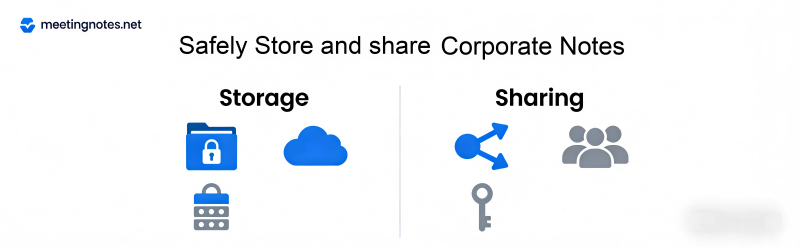
Secure Storage Practices
Choose the Right Location
Meeting notes should be stored in centralized, secure systems. Not on personal drives. Not on unencrypted USB sticks. And not in consumer cloud accounts.
Good storage options:
· Enterprise document management systems with access controls
· Secure corporate cloud storage with encryption
· Meeting management platforms with built-in security
· Encrypted databases for highly sensitive materials
Implement Access Controls
Not everyone needs access to everything. Implement role-based access.
· Board minutes: Board members, executives, corporate secretary
· Executive meetings: C-suite, direct reports as needed
· Department meetings: Department members, relevant stakeholders
· Project meetings: Project team, sponsors, key stakeholders
Encrypt Everything
Encryption protects data at rest and in transit. Use strong encryption standards. And manage encryption keys properly.
Maintain Audit Logs
Track who accesses what. Audit logs help detect unauthorized access. And they provide accountability if issues arise.
Secure Sharing Practices
Minimize Distribution
Only share with people who genuinely need the information. Resist the urge to cc everyone. More copies mean more risk.
Use Secure Channels
Avoid:
· Personal email accounts
· Consumer messaging apps
· Unencrypted file sharing services
· Public cloud links without access controls
Prefer:
· Corporate email with encryption
· Secure document sharing platforms
· Role-based access in document management systems
· Secure collaboration tools with audit trails
Control External Sharing
Be especially careful sharing with outsiders. Consultants. Board members using personal email. External counsel. Each external share increases risk.
External sharing best practices:
· Use secure guest access in corporate systems
· Implement time-limited access
· Require NDAs before sharing sensitive materials
· Track all external distributions
Retention and Disposal
Keeping notes forever is not always required. And it increases risk. Develop clear retention policies.
Retention considerations:
· Legal requirements. Some industries require specific retention periods.
· Business needs. How long are these notes operationally useful?
· Risk management. Older notes may pose unnecessary liability.
Secure disposal:
· When notes reach end of life, dispose of them securely.
· Delete digital copies completely. Do not just move to trash.
· Shred physical copies.
· Maintain records of what was destroyed and when.
Compliance Considerations
Meeting notes may be subject to various regulations. Understand your obligations.
Key regulations:
· GDPR. European data protection rules affect how you handle personal information.
· CCPA. California privacy law gives consumers rights over their data.
· HIPAA. Healthcare information requires special protection.
· SOX. Public companies must maintain accurate records of financial decisions.
· Industry-specific rules. Finance, healthcare, and other sectors have additional requirements.
Security with AI Meeting Tools
AI tools like MeetingNotes can improve security. But you need to choose carefully. Not all AI tools meet enterprise security standards.
Security features to look for:
· End-to-end encryption
· SOC 2 Type II compliance
· GDPR compliance
· Data residency controls
· No training on your data
· Enterprise access controls
MeetingNotes was built with security in mind. It offers enterprise-grade encryption, compliance certifications, and strict data protection. Your sensitive meeting notes stay protected.
Secure your meeting documentation. Learn about MeetingNotes enterprise security features.
Conclusion
Meeting notes contain valuable, sensitive information. Protecting them is not optional. It is essential for security, compliance, and good governance.
Implement the practices in this guide. Store notes securely. Share carefully. Control access. And maintain proper retention. Your organization will be safer for it.
Security is not a one-time task. It requires ongoing attention. Review your practices regularly. Update as threats evolve. And stay vigilant.