AI Summaries
 Action Items
 AI Chat
 Teams & Collaboration
 Teams & Collaboration
 Teams & Collaboration
 Teams & Collaboration
 Teams & Collaboration
 Teams & Collaboration
 Teams & Collaboration
 Teams & Collaboration
 Teams & Collaboration
 Integrations
  Personal Productivity
 Blog
Blog  Guide
Guide Virtual meeting etiquette is not optional anymore. It never really was, but with remote work becoming the norm for most companies, knowing how to follow virtual meeting etiquette matters more than ever.
Professionals spend a lot of time in online meetings every week. Without proper virtual meeting etiquette, those meetings turn into chaotic, unproductive sessions where nobody knows who is speaking, background noise drowns out important points, and half the participants zone out within ten minutes.
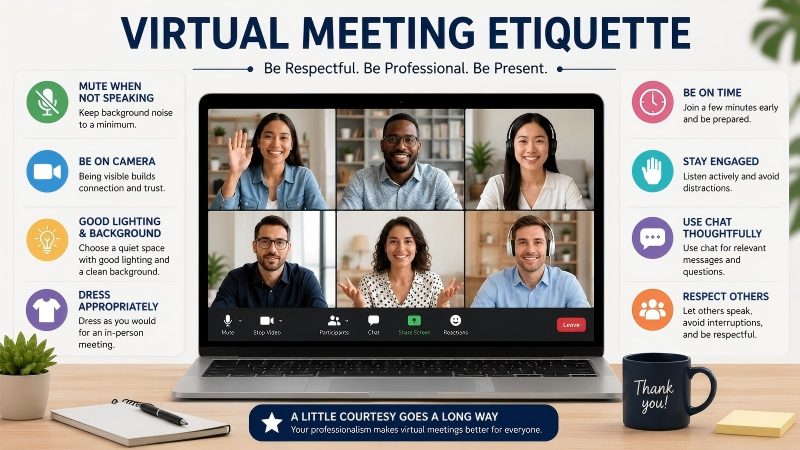
This guide covers everything about virtual meeting etiquette — from the basic rules to platform-specific tips. Understanding virtual meeting etiquette helps teams run smoother calls and get more done.
Part 1. What Is Virtual Meeting Etiquette?
Virtual meeting etiquette refers to the set of unwritten rules and best practices that govern behavior during online meetings. It covers everything from how you dress on camera to whether you should mute your microphone when not speaking.
The meaning of virtual meeting etiquette is simple: it is about showing respect for other participants and making sure the meeting runs smoothly.
The importance of virtual meeting etiquette goes beyond just being polite. Poor online meeting etiquette leads to wasted time, miscommunication, and frustrated team members. Good virtual meeting etiquette, on the other hand, keeps meetings focused, productive, and actually enjoyable for everyone involved.
Part 2. Why Virtual Meeting Etiquette Matters
Virtual meetings are different from in-person meetings. In a physical conference room, people naturally pick up on body language, eye contact, and social cues. On a video call, most of those signals disappear. That is where virtual meeting etiquette steps in to fill the gap.
Without clear virtual meeting etiquette rules, teams run into problems like people talking over each other, participants joining from noisy coffee shops, or someone leaving their camera on while eating lunch.
These might seem small, but they add up. They distract from the actual work and make meetings less effective. Practicing good virtual meeting etiquette prevents these issues before they start.
Remote work meeting etiquette also matters for inclusion. When teams follow consistent virtual meeting etiquette guidelines, everyone gets a fair chance to participate. Quiet voices are heard. People in different time zones are not ignored. And those who rely on captions or transcription services can actually follow along.
This is why virtual meeting etiquette is not just a nice-to-have — it is essential for modern teams.
Part 3. Core Virtual Meeting Etiquette Rules for Every Meeting
These virtual meeting etiquette rules apply to almost every online meeting, regardless of platform or team size. Following these virtual meeting etiquette guidelines will improve your meetings immediately.
1. Test Technology Before Joining
Join the meeting a few minutes early to check your audio, video, and internet connection. Nothing derails a meeting faster than someone spending the first five minutes figuring out how to unmute.
This is one of the most basic virtual meeting etiquette tips, and also the most overlooked. Good virtual meeting etiquette starts before the meeting even begins.
2. Mute When Not Speaking
Background noise is the enemy of productive meetings. Keep yourself muted unless you are talking. Keyboard clicks, dog barks, construction work outside — all of it travels through the microphone and distracts others.
Video call etiquette means protecting other people's ability to hear the speaker clearly. This is one of the most fundamental virtual meeting etiquette rules that every professional should follow.
3. Use a Professional Background
Your camera background says something about you. It does not need to be a perfectly decorated office, but it should not be a pile of laundry or a messy kitchen counter.
Use a clean, tidy space or a virtual background if needed. Professional virtual meeting etiquette starts with what people see when you turn on your camera. Your visual presentation is a key part of virtual meeting etiquette.
4. Dress Appropriately
You do not need a suit and tie for every video call, but dressing professionally matters. At minimum, wear something you would feel comfortable wearing in a real office. This is a fundamental part of virtual business meeting etiquette that some people forget.
How you dress affects how you present yourself, and virtual meeting etiquette includes your appearance.
5. Be Punctual
Showing up on time is basic respect. When you join a meeting late, it interrupts the flow and wastes everyone's time. If you know you will be late, send a quick message to the meeting organizer beforehand.
Punctuality is one of those virtual meeting etiquette rules that applies to every type of meeting. Being on time is a core element of virtual meeting etiquette.
6. Minimize Distractions
Close unnecessary tabs. Silence phone notifications. Put your computer on do not disturb mode. Multitasking during meetings is obvious, and it shows that you are not fully present.
Good video conferencing etiquette means giving the meeting your attention. Minimizing distractions is a key part of practicing virtual meeting etiquette.
7. Speak Clearly and Introduce Yourself
Before speaking, say your name — especially in larger meetings. Speak clearly into your microphone. This helps with captions, transcription, and anyone who might have difficulty hearing.
Video conference etiquette rules always include clear communication as a priority. Clear communication is at the heart of good virtual meeting etiquette.
8. Use the Raise Hand Feature
Most platforms have a raise hand feature. Use it. Interrupting someone mid-sentence is rude in person, and it is even worse on video calls where audio lag makes overlapping speech a nightmare. Waiting your turn is one of the simplest virtual meeting etiquette examples that makes a big difference. Using platform features correctly is part of solid virtual meeting etiquette.
9. Keep Camera On When Possible
Camera-on meetings create more engagement and better connection between participants. Of course, there are exceptions — bad internet, personal circumstances, or long meetings where camera breaks are reasonable.
But as a general rule, keeping your camera on is part of solid online meeting etiquette. Camera usage is one of the most debated aspects of virtual meeting etiquette, but the consensus is clear: when possible, turn it on.
10. Follow the Agenda
Meetings without agendas waste time. Meeting organizers should share an agenda beforehand, and participants should stick to the topics being discussed. Going off-topic is one of the most common meeting etiquette mistakes. Respecting the agenda is a sign of mature virtual meeting etiquette.
Part 4. Platform-Specific Virtual Meeting Etiquette Tips
Different platforms have different features, and virtual meeting etiquette adapts to each one. Understanding platform-specific virtual meeting etiquette helps you navigate any meeting environment.
Zoom Meeting Etiquette
Zoom is still the most widely used video conferencing platform. Zoom meeting etiquette includes using the waiting room feature as a host, managing screen sharing permissions, and knowing how to use breakout rooms effectively.
Participants should familiarize themselves with Zoom's mute, camera, and chat controls before joining. Zoom meeting etiquette is a subset of virtual meeting etiquette that every remote worker should master.
Microsoft Teams Meeting Etiquette
Teams meeting etiquette for attendees involves understanding how Teams notifications work, using the chat panel for questions without interrupting, and knowing when to use reactions versus speaking.
Microsoft Teams meeting etiquette guide recommendations also include using the raise hand button and being aware of your presence status. Teams meeting etiquette follows the same principles as general virtual meeting etiquette, with platform-specific adjustments.
Part 5. Virtual Meeting Etiquette for Employees: A Quick Reference
If you are an employee joining virtual meetings regularly, here is a practical virtual meeting etiquette checklist to keep handy. This virtual meeting etiquette checklist covers the essentials of virtual meeting etiquette for employees.
· Test audio and video before each meeting — a core virtual meeting etiquette practice
· Find a quiet location with good lighting for better virtual meeting etiquette
· Mute when not speaking — always, the #1 virtual meeting etiquette rule
· Use headphones to reduce echo and background noise, improving virtual meeting etiquette
· Dress professionally from head to toe, part of professional virtual meeting etiquette
· Close unrelated applications and notifications to maintain virtual meeting etiquette
· Take notes using pen and paper to avoid keyboard noise, a virtual meeting etiquette tip
· Introduce yourself before speaking in larger groups, standard virtual meeting etiquette
· Use the raise hand feature instead of interrupting, basic virtual meeting etiquette
· Keep your camera on unless there is a good reason not to, recommended virtual meeting etiquette
· Stay engaged — nod, react, and participate, showing good virtual meeting etiquette
· Leave the meeting promptly when it ends, respecting virtual meeting etiquette norms
Having a virtual meeting etiquette policy in your organization helps ensure everyone follows the same standards. When the whole team agrees on basic virtual meeting etiquette rules, meetings run smoother and nobody feels unsure about what is expected. A clear virtual meeting etiquette policy removes guesswork and sets the tone for professional behavior.
Part 6. How to Improve Virtual Meeting Etiquette on Your Team
Improving virtual meeting etiquette is not about writing a 20-page rulebook. It is about setting clear expectations and leading by example. Here is how to improve virtual meeting etiquette step by step.
1. Start by documenting your team's virtual meeting guidelines.
Keep it short — one page is enough. Cover the basics: camera expectations, mute rules, punctuality, and how to handle technical issues. Share it with everyone and revisit it every few months. A written virtual meeting etiquette guide keeps everyone aligned.
2. Meeting hosts play a big role in enforcing virtual meeting etiquette.
They should start on time, follow the agenda, and gently enforce etiquette rules. If someone is causing background noise, a polite reminder to mute works better than ignoring it. If the meeting is running over, wrap it up. Respecting people's time is part of good virtual meeting etiquette.
3. Another way to improve meeting quality is to use tools that capture meeting details automatically.
MeetingNotes records and transcribes meetings, generates AI summaries, and tracks action items — so the team can focus on the conversation instead of scrambling to take notes.
 MeetingNotes AI Note Taker
 - • Real-time AI transcription with high accuracy
- • Automated meeting summaries & action items
- • Seamlessly syncs with Zoom, Teams & Google Meet
- • Securely store and search all your meeting history

When teams use MeetingNotes, they can focus on practicing good virtual meeting etiquette instead of worrying about missing details.
Part 7. Virtual Meeting Etiquette Do's and Don'ts
A quick virtual meeting etiquette do's and don'ts reference helps reinforce good habits. Use this virtual meeting etiquette do's and don'ts list as a quick refresher before important calls.
✅Do's
· 👍Do test your equipment before joining — essential virtual meeting etiquette
· 👍Do use a headset or headphones when possible, improving virtual meeting etiquette
· 👍Do mute yourself when not speaking, the golden rule of virtual meeting etiquette
· 👍Do keep your camera on for engagement, following virtual meeting etiquette best practices
· 👍Do participate actively and ask questions, showing strong virtual meeting etiquette
· 👍Do follow the meeting agenda, respecting virtual meeting etiquette standards
· 👍Do send a follow-up summary after the meeting, completing the virtual meeting etiquette cycle
❌Don'ts
· 👎Don't join late without notice, violating virtual meeting etiquette basics
· 👎Don't eat on camera, breaking virtual meeting etiquette norms
· 👎Don't multitask or check your phone, ignoring virtual meeting etiquette principles
· 👎Don't talk over other participants, disrespecting virtual meeting etiquette rules
· 👎Don't leave your camera on a messy background, failing virtual meeting etiquette standards
· 👎Don't ignore the chat or raise hand features, missing virtual meeting etiquette opportunities
· 👎Don't go off-topic during the meeting, derailing virtual meeting etiquette discipline
Part 8. Best Practices for Virtual Meetings Beyond Etiquette
Virtual meeting etiquette is only part of the picture. Running effective online meetings also requires good process and the right tools. These virtual meeting best practices complement your virtual meeting etiquette efforts.
First, always have an agenda. Meetings without clear purposes should not exist. Share the agenda ahead of time so participants can prepare. This is one of the most important virtual meeting best practices. Agendas support virtual meeting etiquette by giving everyone a clear framework.
Second, keep meetings as short as possible. If something can be an email, send an email. If a 60-minute meeting can be 30 minutes, make it 30 minutes. Respecting time is part of professional virtual meeting etiquette. Shorter meetings naturally encourage better virtual meeting etiquette because people stay more focused.
Third, assign roles. Who is facilitating? Who is taking notes? Who is tracking action items? When roles are clear, meetings run better. This is where MeetingNotes becomes useful — it automatically captures meeting notes, transcribes discussions, generate AI Summary, and identifies action items, so your team does not need to assign someone to play secretary.
Fourth, record meetings when appropriate. Not every meeting needs to be recorded, but important ones should be. Recordings help people who could not attend, and they create a reference for decisions made.
Recording also supports virtual meeting etiquette by allowing teams to review behavior and improve. The best way is to use Meeting Recorder.
Part 9. Frequently Asked Questions About Virtual Meeting Etiquette
Question 1. What is the most important rule of virtual meeting etiquette?
Muting yourself when not speaking is probably the single most important virtual meeting etiquette rule. Background noise is the number one complaint in online meetings, and muting solves it instantly. This virtual meeting etiquette rule is simple but makes the biggest difference.
Question 2. Should cameras be on during virtual meetings?
In most cases, yes. Camera-on participation improves engagement and helps with nonverbal communication. However, flexibility is important. Some people have bandwidth limitations or personal circumstances that make camera-off necessary. Good virtual meeting etiquette guidelines balance expectations with empathy. Virtual meeting etiquette is about respect, not rigidity.
Question 3. How do you handle poor virtual meeting etiquette from colleagues?
Address it politely and privately. If someone consistently joins late or forgets to mute, send them a friendly message rather than calling them out in front of everyone. If the problem is systemic, consider creating a team virtual meeting etiquette policy. Improving virtual meeting etiquette is a team effort, not a one-person job.
Question 4. What tools help with virtual meeting etiquette?
Beyond the video conferencing platform itself, AI meeting tools like MeetingNotes help teams maintain better meeting discipline. With automatic transcription, AI summaries, and action items assignment, teams spend less time worrying about missing details and more time focusing on the actual conversation and practicing good virtual meeting etiquette.
Conclusion: Master Virtual Meeting Etiquette for Better Meetings
Virtual meeting etiquette is not about perfection. It is about making a consistent effort to be respectful, prepared, and present. Teams that take virtual meeting etiquette seriously see real benefits: Meetings end faster. Decisions are clearer.
And when meetings go well, work gets done. Virtual meeting etiquette is not just about being polite — it is about being effective. To make the most of your virtual meetings, consider using MeetingNotes , focus on the conversation and practicing great virtual meeting etiquette, and let MeetingNotes capture the rest.